

Why Traditional Inventory Methods Fail for Monuments and Vaults
For monument and vault shops, traditional inventory methods are a constant source of frustration. Relying on paper records, spreadsheets, and simple visual checks might work for a small retail store, but it breaks down completely when your inventory consists of multi-ton granite blocks and concrete slabs. You cannot simply move a stack of granite to count what is behind it, and a clipboard cannot tell you if a specific slab in the yard has already been committed to a customer's order.
This manual approach creates several costly problems. It leads to “ghost inventory”—items that appear available on paper but are actually sold, damaged, or lost. It makes it nearly impossible to track a monument's journey from raw material to finished product, creating bottlenecks in production. When the office thinks a stone is ready for lettering but it is actually still a raw block in the yard, the entire workflow grinds to a halt, leading to delays and frustrated families.
The Core Principles of Effective Monument Inventory Management
Effective monument inventory management is not just about counting what you have; it is about having real-time visibility into the status, location, and stage of every piece of material and finished product. This means tracking items from the moment they arrive as raw materials to the moment they are installed at the cemetery.
Adopting this approach requires a shift in thinking. Instead of viewing inventory as a static count, see it as a dynamic flow. Implement a system where every item, from a raw granite block to a finished headstone, has a unique identity. This allows you to know not just that you have five gray granite slabs, but to know the specific history and current status of each individual slab. This level of detail is the foundation for accurate production scheduling, reliable delivery promises, and a clear financial picture of your business.
A Step-by-Step Guide to Tracking Inventory in Your Shop
Implementing a robust tracking system may seem daunting, but you can approach it in manageable stages. The goal is to create a single source of truth that your entire team—from sales to production to delivery—can rely on.
Step 1: Define Your Inventory Categories
Start by classifying everything you need to track. Your categories might include:
- Raw Materials: Uncut granite and marble blocks, raw concrete components for vaults.
- Work-in-Progress (WIP): Stones that have been cut, shaped, or polished but are not yet finished. This category is crucial for understanding your production capacity.
- Finished Goods: Completed monuments, markers, and vaults ready for delivery or installation. This includes pre-made stock items.
- Ancillary Supplies: Items like bronze lettering, vases, and setting compounds that are part of a final order.
Step 2: Assign Unique Identifiers to Everything
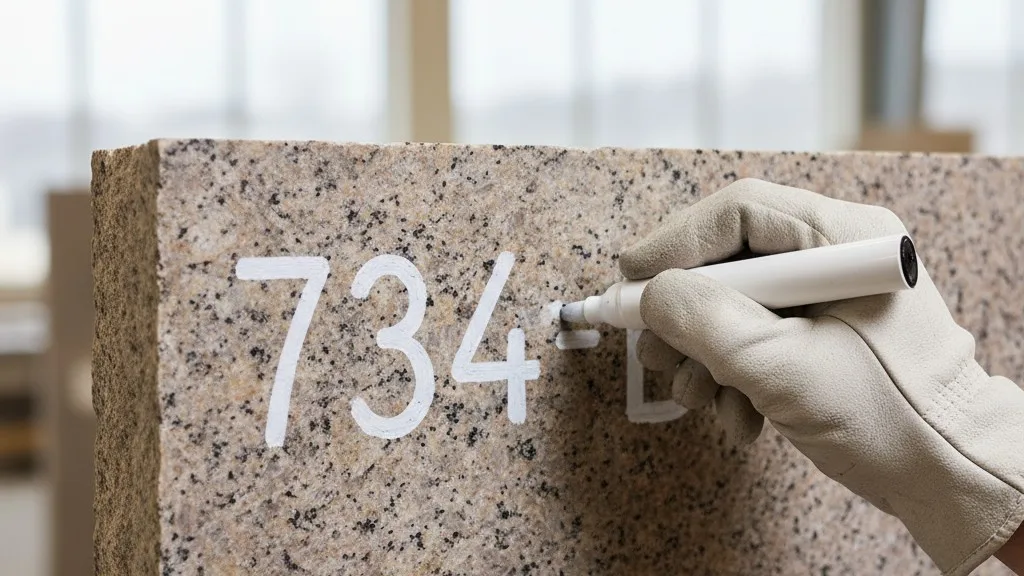
Every significant piece of inventory needs a unique ID. A simple sequential number is a good start. You can use durable tags, paint markers, or stencils to physically label each item. For raw slabs in the yard, this might mean painting the ID on the edge. For finished stones, a discreet tag can be used. This unique ID is the key that links the physical item to its digital record.
Step 3: Establish Checkpoints in Your Workflow
Identify the key transition points in your production process. These are the moments when an item's status changes. Each time an item passes a checkpoint, its record should be updated. Common checkpoints include:
- Receiving: When a raw slab or pallet of materials arrives.
- Committed to Order: When a specific slab is assigned to a customer's monument.
- Entering Production: When the stone moves from the yard to the saw or CNC machine.
- Through Production Stages: After cutting, polishing, sandblasting, and lettering.
- Final Inspection/QC: When the finished piece is approved.
- Ready for Delivery: When the monument is moved to the staging area for installation.
- Delivered/Installed: The final step in the process.
Step 4: Choose Your Tracking Tool
While a well-organized spreadsheet is better than paper, it still requires manual updates and is prone to errors. For true real-time tracking, a centralized software system is necessary. A platform like Petra allows your team to update an item's status from a tablet or computer at each checkpoint. This means the office manager can see that a stone has just left the sandblasting booth without having to walk out to the shop floor and ask. This real-time data is essential for coordinating with families and scheduling installations accurately.
Connecting Inventory to Sales and Production
The true power of a good inventory system is how it connects different parts of your business. When your inventory, sales, and production schedules are linked, you can operate more efficiently and provide better service. When a salesperson creates a quote for a family, they should be able to see exactly what materials are on hand and available. This prevents the painful situation of selling a specific type of granite that is actually out of stock or already committed to another project.
Once an order is placed, the system can automatically commit the required slab, taking it out of available inventory. This digital reservation ensures it will not be accidentally sold or used for another job. As the stone moves through production, updates are visible to everyone. The delivery coordinator can see which monuments are nearing completion and begin planning their installation schedule. This proactive approach, detailed in our guide to monument shop software, replaces last-minute scrambles with a smooth, predictable workflow.
Managing Burial Vault Inventory
The principles of tracking heavy stone inventory apply directly to burial vaults, but with a few unique considerations. Vaults are often produced in batches and may have different grades or features, like liners or special seals. A robust inventory system should be able to manage both vaults and monuments within the same framework, as many businesses offer both.

Tracking vault inventory involves monitoring raw materials like concrete and liners, finished vault components, and assembled units. Because vaults are often delivered on a tight schedule dictated by the funeral service, knowing exactly what is available and where it is located is critical. A delivery driver needs to be certain they are loading the correct type and size of vault for a specific service. A centralized system that tracks production status and finished inventory prevents costly and distressing delivery errors. This is a key reason why many plants are moving away from paper-based systems, as explored in our article on burial vault management software.
Avoiding Common Pitfalls in Inventory Tracking
Even with a good system, there are common mistakes to avoid. One of the biggest is inconsistent use. If only half the team updates the system, the data becomes unreliable, and people will revert to old habits. Training is essential. Everyone must understand why the system is important and how to use it correctly at their specific workstation.
Another pitfall is failing to account for waste or scrap. When a stone cracks during cutting or a mistake is made in lettering, that piece must be removed from inventory. A good system will have a process for marking items as scrapped, which keeps your on-hand counts accurate and can help identify recurring problems in your production process. Finally, remember to perform periodic physical inventory counts to reconcile your digital records with the reality in the yard. This helps catch any discrepancies that have crept in over time.
From Chaos to Clarity
Moving from a chaotic, paper-based system to a clear, real-time view of your inventory is a significant change, but the benefits are substantial. It reduces errors, smooths out production, and allows you to make promises to families that you can confidently keep. By tracking each stone and vault from arrival to installation, you gain control over your operations and build a more resilient, profitable business.
A modern operations platform can provide the visibility you need across inventory, production, and scheduling. If you are ready to see how a unified system can help your shop, we would be happy to show you. Schedule a conversation with us to learn more about Petra.


